Introduction
MySQL is a free database included with many web hosting services on linux and Windows platforms. C# ASP .NET developers, using a MySQL database back-end, may notice an unnecessarily large list of sleeping connections that remain online in MySqlAdministrator. This can cause wasteful use of memory on the server, degrade performance, and ultimately, create an error in your C# .NET web application. For example, if you go over the limit set by the database administrator for number of connections, your application will receive a “Too Many Connections” error in MySQL. This can cause your application to fail to display data, fail to load pages, or just freeze up on users viewing the .NET site.
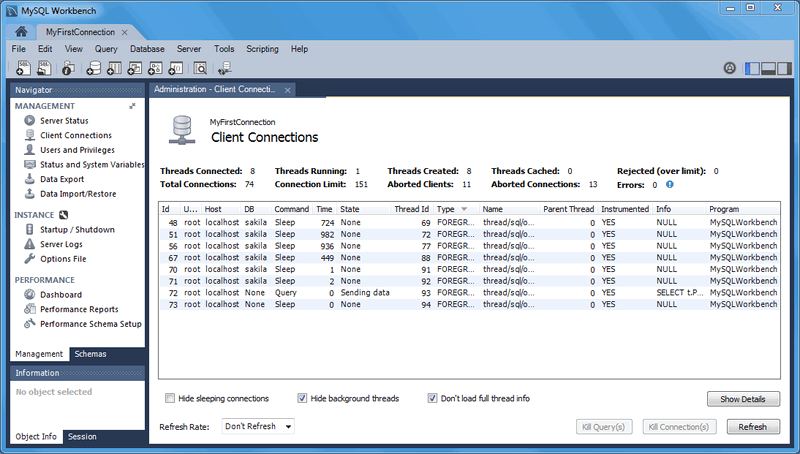
Too Many MySQL Connections
Open MySqlAdministrator, click on the Server Connections link, and view the active Threads. Web-based ASP .NET applications seem to incorrectly handle connection pooling, and thus leave too many connections in a Sleep state while the Time elapsed continues increasing. These connections would normally be reused by the .NET database driver, and occassionally they are. However, sometimes new connections are opened and existing sleeping connections are forgotten. They will either time out by the server’s default connection timeout or simply remain until you pass the connection limit and your application fails.
Connection Pooling in MySQL with .NET
All .NET database drivers implement connection pooling in MySQL. This includes ODBC, ADO, MySQLConnector, and MySQLDriver. However, there appears to be a flaw in how pooling is handled.
Normally, a connection is opened when you call MyConn.Open(). You will see the connection active in MySQLAdministrator and a query is executed. The connection is then placed in the Sleep state upon calling MyConn.Close() (rather than actually being closed), awaiting another query from the ASP .NET application. When a new request arrives with the MyConn.Open(), the existing MySQL connection is used, without having to open a new connection. This increases database performance and speed.
The problem in web-based .NET applications is that the driver appears to lose pointers to existing database connections and fails to close them properly. Setting a flag in the database connection string to disable MySQL connection pooling does not appear to work in a web-based ASP .NET application. ie.
MySQL ODBC Connection String
Driver={MySQL ODBC 3.51 Driver};Server=yourserver.com;Database=yourdatabase;User=databaseuser;Password=databasepassword;Pooling=false;
Taking Matters into Your Own Hand
Since .NET won’t properly close connections that have timed out nor handle the pooled connections properly, we need to implement code that will manage the sleeping connections ourselves. This is required to prevent ASP .NET MySQL applications from failing with the “Too Many Connections” error.
There are two possible solutions:
- Killing the connection after closing it - the idea is that each time you open and close a connection, you add a block of code to physically kill the MySQL process ID. One drawback of this is that you, in effect, remove the advantage of MySQL connection pooling. This may also add an additional burden on the MySQL database of killing the connections each and every time you open one.
MyConn.Open();
…
MyConn.Close();
MyConn.Kill(); // This routine would be coded by you
- A better solution is to write a connection management routine that occasionally scans for sleeping connections which have surpassed a realistic timeout value, and kill them ourselves. The good news is that MySQL offers the “show processlist” and “kill process_id” command, which allows us to take control of the problem in ASP .NET. For example:
show processlist
kill 9012345
Killing Sleeping Connections in C# ASP .NET
The code routine below searches all MySQL connections under your username and kills all sleeping connections which have elapsed a specific number of seconds. For example, all connections in a Sleep state that have a Time value greater than 100 seconds should be closed, and are thus in a good position to be killed. The code example below assumes you are using ODBC to connect to MySQL, but can be easily changed to your desired database driver with a search and replace.
1 | using System.Data.Odbc; |
Call it with the following code to kill sleeping connections >= 100 seconds.
1 | KillSleepingConnections(100); |

The above code first calls a “show processlist”, which tells MySQL to return a recordset containing all active connections. These connections can be in a variety of states such as: Opening, Closing, Executing Query, Sleep, etc. The function specifically looks for connections in the Sleep state. It then checks the Time value returned by the query to see how long the connection has been sleeping. The process ID (thread id) of connections which exceed the timeout value are recorded in an array list. We then close the process list connection and now loop through the array list of connections that need to be killed. We issue a “kill processid” command which effectively closes and deletes the connection from the MySQL database.
This function should be routinely called from a page within your C# ASP .NET web application. For example, it may be included in your default.aspx page or a less popular page. It can even be included within a scheduler task. The idea is that each time the page loads, your MySQL database is checked for sleeping connections that have timed out and have not been killed.
Automating Your Web Application To Kill Sleeping Connections
You can automate the above method by adding it to a Timer object within your Global.asax.cs, as follows:
1 | static public System.Timers.Timer MyKillTimer = new System.Timers.Timer(); |
Conclusion
The above code sample can effectively manage your sleeping MySQL connections in C# ASP .NET, allowing you to take control into your own hands. Always remember to properly close all data readers and database connections, in addition to managing sleeping connections, to have a smooth running ASP .NET web application.
About the Author
This article was written by Kory Becker, software developer and architect, skilled in a range of technologies, including web application development, machine learning, artificial intelligence, and data science.
Sponsor Me